
Quick answer
Scan the complicated receipts. Type the simple ones.
Take a photo when a receipt has several items, taxes, discounts, or details you may want later. Type the expense when all you need is a name, amount, date, and category. You do not have to force every purchase through the same workflow.
A scan should save typing, not take away control.Treat the result as a draft. Check the store name, date, total, and item amounts before you save it. In Higxel, the receipt can stay as one expense while each item keeps its own category; grouping is optional.
The tradeoffs
Match the method to the receipt.
| Situation | Receipt scanning | Manual entry |
|---|---|---|
| Several line items | Saves repetitive typing and keeps the detail | Gets tedious quickly |
| One simple purchase | Can be more work than you need | Usually the quickest choice |
| Faded or folded receipt | Will probably need corrections | Works if you can still read it |
| You may need proof later | Keeps the receipt beside the expense | Easy to forget where the photo went |
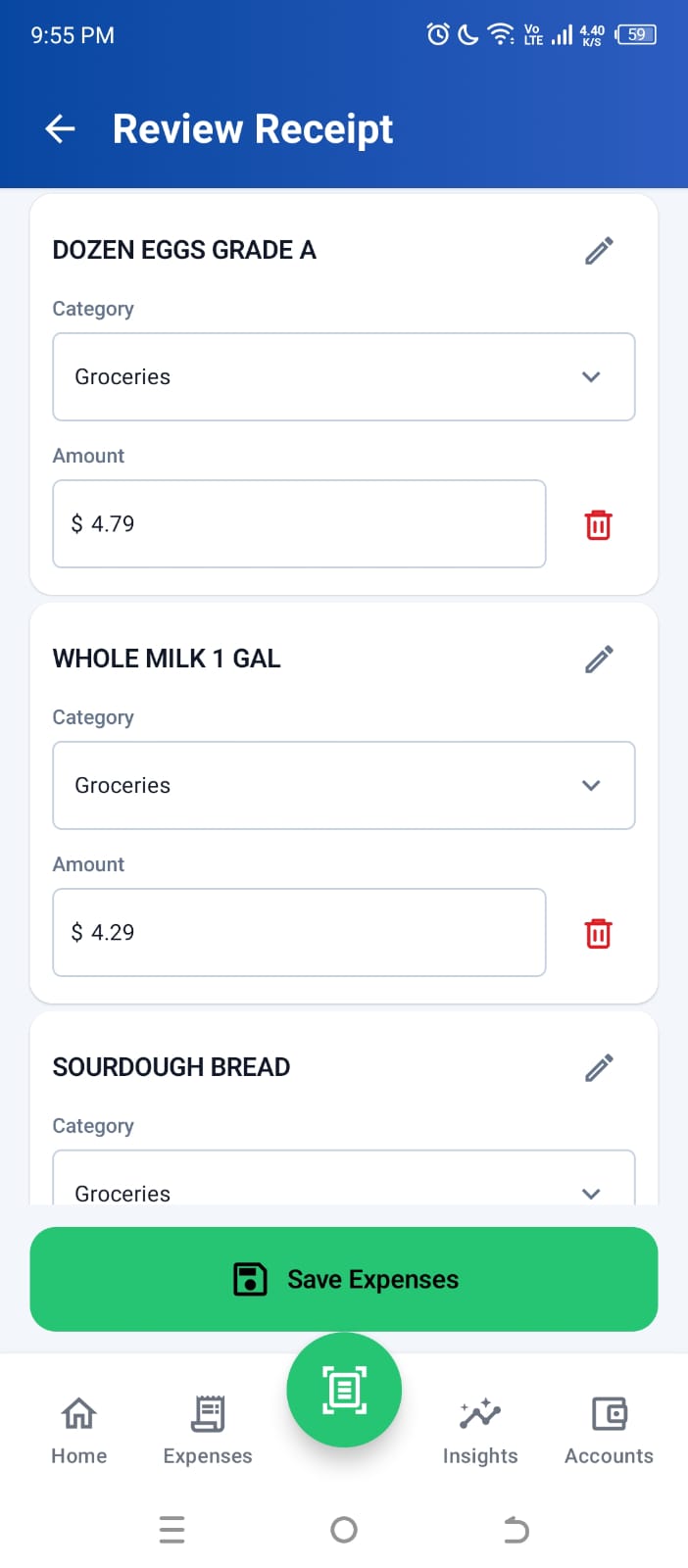
The step that matters
Give the result a quick reality check.
- Start with the total. If it does not match the receipt, stop and correct it.
- Look at the date. One wrong month can make a budget look better or worse than it was.
- Check discounts and tax. These are the places where item amounts can be misleading.
- Keep the image when it matters. It may be useful for a return, reimbursement, or warranty.
The FTC recommends keeping receipts and related records for online purchases. How long you keep yours depends on the purchase, but a receipt attached to a searchable expense is far easier to find than one lost in a camera roll.
How this was created
We put the current Higxel scan-and-review flow beside a bare-bones manual entry, counted the decisions each one asks you to make, and checked the public consumer guidance below about keeping purchase records.
Sources