
The quick answer
Add the accounts that meaningfully affect your money: cash, bank accounts, wallets, investments, credit cards, and loans. Record each current balance, connect new expenses and income to the right account, and use transfers when money moves between your own accounts.
Start with the accounts that matter
You do not need to recreate every financial document on your phone. Begin with accounts whose balances help you answer a real question.
Cash, banks, and wallets
These accounts explain what is available for everyday spending and which balance an expense should reduce.
Savings and investments
Include them when you want a broader picture of assets, even if you do not pay ordinary expenses from them.
Credit cards and loans
Track these separately from assets so debt does not look like available money.
What does net worth tell you?
The basic calculation is simple: total assets minus total debt. If your assets are worth Rs 300,000 and your tracked debt is Rs 80,000, your net worth is Rs 220,000.
The number becomes useful when you compare it over time. One purchase may lower cash while paying a credit-card bill lowers both cash and debt. A transfer between your own accounts changes where the money sits, but it should not create income or spending.
| Activity | What changes | Net-worth effect |
|---|---|---|
| Expense paid from cash | Cash decreases | Usually decreases |
| Income received today | Selected asset increases | Usually increases |
| Transfer between your accounts | One decreases, one increases | No change |
| Credit-card payment | Asset and debt both decrease | Usually no change |
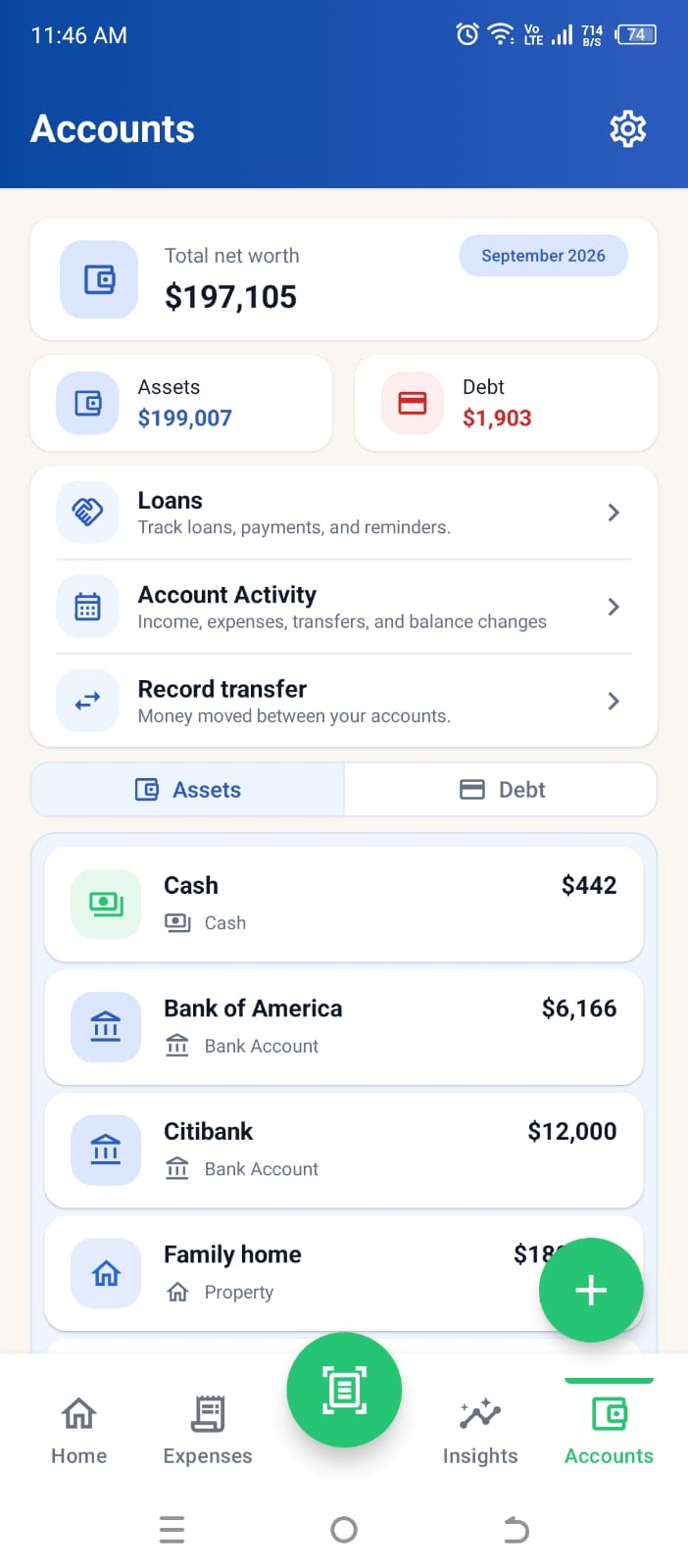
See accounts and net worth in the current Higxel app
This current screen uses sample data, not customer records. Accounts separates Assets from Debt, shows individual balances, and keeps Loans, transfers, and account activity close by. Loans given and loans taken can contribute to assets and debt; the Loans screen tracks their repayments and reminders separately. Use this view for balances and net worth; Home is for monthly income, spending, and budget progress. See how personal loans work in Higxel.
How to keep account balances believable
- 1
Enter today’s real balance
Use the balance you can confirm now rather than trying to reconstruct months of forgotten activity first.
- 2
Choose the account when recording activity
Connect expenses and income to the account they actually affected. Use Skip Account when you want the record without changing a tracked balance.
- 3
Use transfers for your own money
When money moves between two accounts you own, record a transfer instead of an expense and separate income.
- 4
Use a balance adjustment when reality differs
If the app balance no longer matches the real account, correct it openly. A visible adjustment is more useful than silently changing history.
Common account-tracking mistakes
- Counting a transfer as income. Moving your own money does not make you richer.
- Treating available credit as an asset. A credit limit is borrowing capacity, not money you own.
- Adding every possible account immediately. Start with the balances you will actually maintain.
- Forcing old expenses into the current month. Begin with a confirmed balance and keep new activity accurate from there.
- Ignoring balance differences. Record an adjustment so account history explains why the number changed.
Install Higxel for Android to track accounts alongside expenses and income.