
The quick answer
Choose a realistic amount for the spending you want the budget to cover. Set it once for the month, record expenses as they happen, and check the amount remaining before making decisions—not only after the month ends.
Choose a monthly amount you can explain
Start with recent spending rather than an ideal number pulled from memory. Look at ordinary expenses, recurring commitments, and irregular purchases that are likely this month.
- 1
Decide what the budget covers
Be clear whether it covers all tracked expenses or only flexible spending. A number is hard to follow when its boundaries keep changing.
- 2
Use a normal month as the starting point
Review recent expenses and remove one-off events that are unlikely to repeat. Add known costs that are coming this month.
- 3
Leave room for real life
A budget that assumes nothing unexpected will happen is easy to break and hard to trust.
Use the budget before the month is over
If a Rs 60,000 budget has Rs 18,000 remaining halfway through the month, the useful question is not whether the number looks good. Ask which bills are still coming and whether today’s pace leaves enough room for them.
| Check | What it tells you | Possible response |
|---|---|---|
| Amount remaining | How much room is left | Slow optional spending if needed |
| Percentage used | How quickly the budget is moving | Compare it with how much of the month has passed |
| Category totals | What caused the spending | Focus on the category you can still influence |
| Upcoming recurring costs | What has not arrived yet | Reserve room before treating the remainder as free |
See monthly budgeting in the current Higxel app
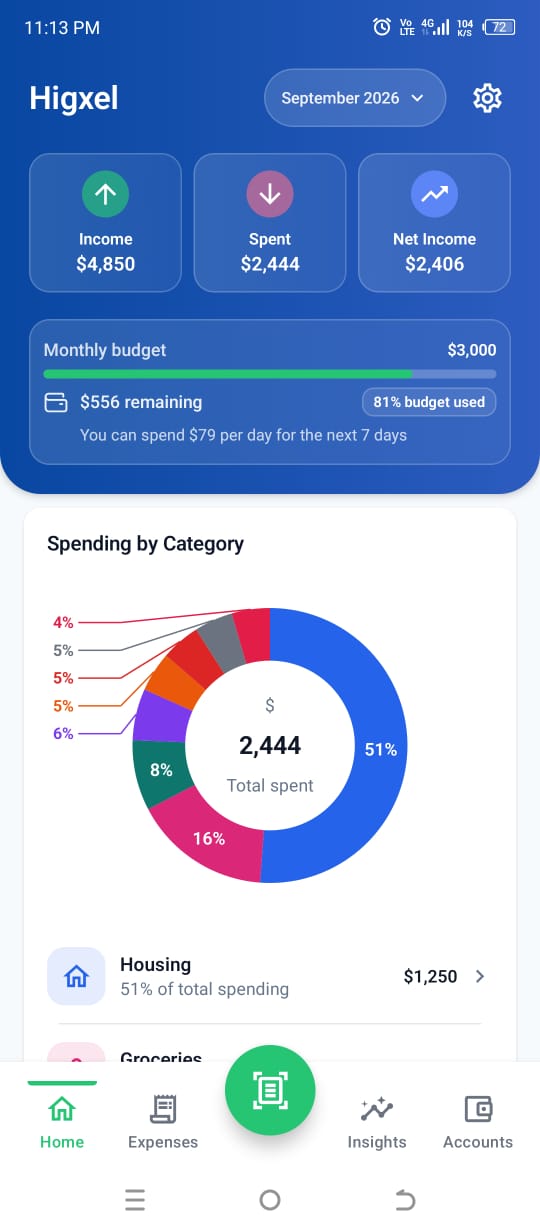
This current screen uses sample data, not customer records. Home keeps monthly spending, budget progress, the amount remaining, and the percentage used together. Scroll down on Home to see which categories produced the total.
Use categories as clues, not tiny budgets
A category breakdown can show that groceries, transport, or dining grew faster than expected. That does not mean every category needs its own strict limit. Start with one monthly budget, then use categories to understand what is happening.
If one category repeatedly causes trouble and you can act on it, give it more attention during your weekly review. Keep the system simple enough that you will continue recording expenses.
Common monthly-budget mistakes
- Setting an unrealistically low number. A budget should guide decisions, not fail on the first normal week.
- Checking only at month-end. A finished month cannot be adjusted.
- Forgetting recurring expenses. Leave room for charges that have not arrived yet.
- Changing the budget whenever spending rises. First understand whether the change is temporary or repeated.
- Creating too much category work. Use detailed limits only where they improve a real decision.
For the daily side of the system, continue with how to track daily expenses on Android. For the money coming in, see how to track income and expenses together.
Install Higxel for Android to track spending against a monthly budget.